
How to Make Custom Interactive Games in Your Language Classroom (Without Code)
And yes, I'm a language teacher saying this.
A few weeks ago, I opened my Business English class with a game I built myself. Not downloaded from a resource site. Not adapted from a template someone else made. Built it from scratch, by me, a language teacher with zero coding background.
It's called Draw That, and here's how it works: each team gets a different sentence on the screen (at the same time), and they have to draw it on their mini whiteboards while their teammates guess. The app tracks points automatically, lets me set the number of teams and rounds, and makes sure no sentence repeats. I used it as a way to do some assessment on my students' language level in a playful manner, that got everyone involved.
And I made it using Canva. This not an ad. I pay for my Canva Pro subscription myself.
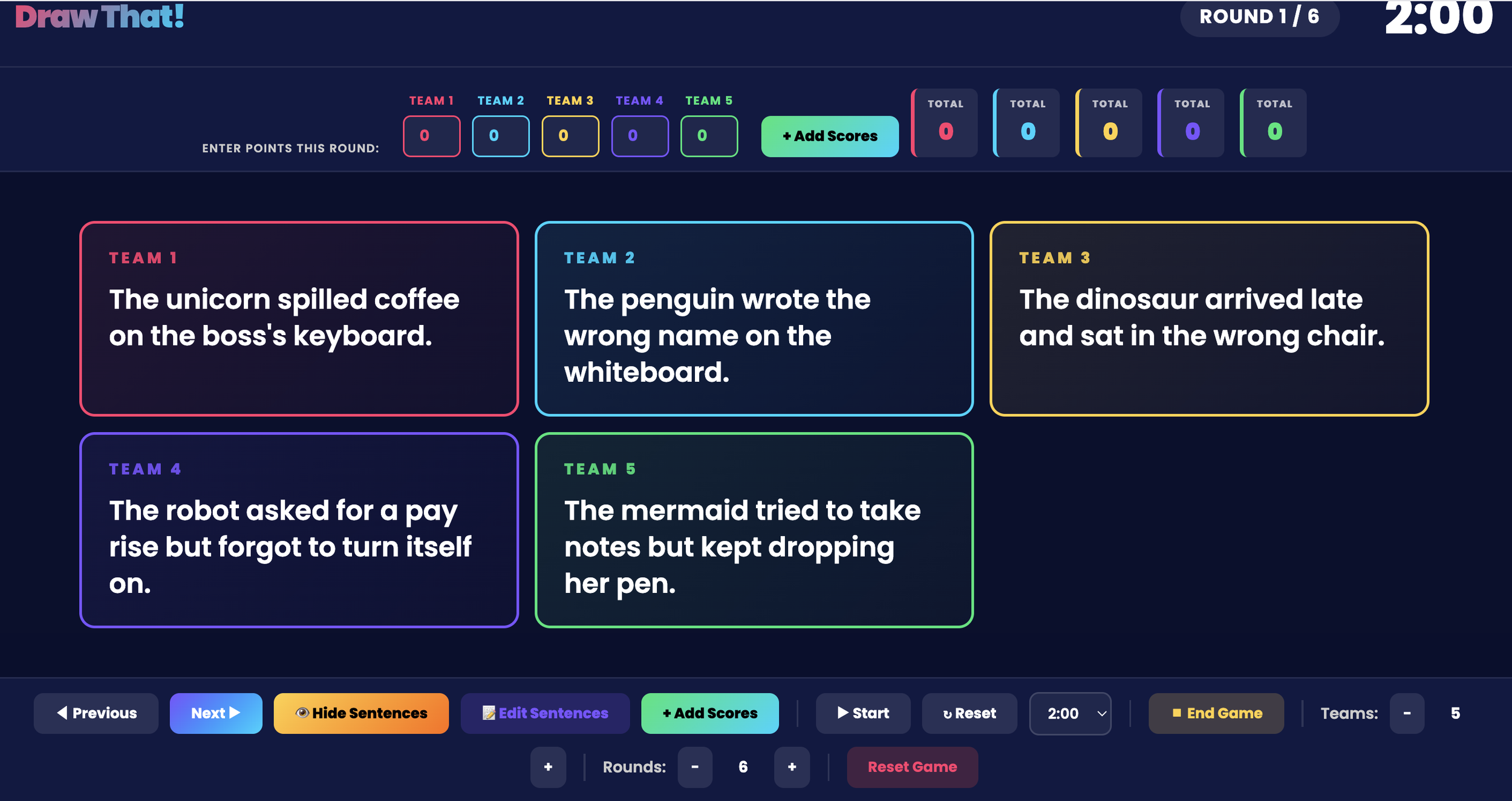
Draw it! Game
Wait, Canva? The design tool?
Yes. That Canva.
Most language teachers know Canva as the place where you make pretty slides or infographics. But Canva has a feature called Canva Code that lets you publish interactive websites and applications, no coding required. Or, if you're willing to experiment with AI-assisted "vibe coding" (more on that in a second), you can go even further and build tools with real logic: scoring systems, randomisation, team management.
You just need a little curiosity, some patience and the AI assistant they provide and that is it.
What "vibe coding" actually means (and why it's not scary)
I want to be honest with you: Draw That wasn't made with a drag-and-drop tool. I used a technique called vibe coding, it is essentially, describing what I wanted to an AI assistant in plain language, and letting it write the code for me.
I told the AI something like: "I want a game where I can enter a list of sentences, set the number of teams and rounds, assign a random sentence to each team, track points, and make sure sentences don't repeat."
The AI wrote it. I tested it. I tweaked the instructions when something didn't work. It wrote it again.
Was it completely smooth? No.
Did it require any prior knowledge of coding? Also no. :)
What it did require was:
Knowing what I wanted pedagogically (the language teacher part, that's us)
Being willing to describe it clearly, like you're explaining it to a very literal assistant
A bit of patience to iterate when the first version wasn't quite right
That's it. If you can write a lesson plan, you can describe an app.
What you can build for your language classroom
Here are ideas across different activity types (games, tools, and in-class resources) all achievable with Canva's built-in features or basic vibe coding:
Games
Drawing games like Draw That → one student draws a sentence or concept, others guess. Works across levels and disciplines, and doubles as a low-stakes first-day diagnostic.
Vocabulary sorting games → students drag words into categories (formal vs. informal, professional vs. casual, register-appropriate vs. not). Great for Business English or academic writing courses.
Sentence builder challenges → scrambled words that groups reconstruct collaboratively. Targets syntax and word order in a way that feels more like a puzzle than a grammar drill.
Taboo-style word games → a player describes a target word without using forbidden words. You control the word bank, the forbidden words, and the categories. Deeply customisable for specific topics.
Spin-the-wheel conversation starters → a digital wheel that lands on a discussion prompt, a grammar structure to use, or a scenario to respond to. Great for speaking warm-ups.
Interactive activities
Dialogue decision trees → students read a professional exchange and choose what to say next. Each choice leads to a different outcome. Perfect for Business English email chains, customer service scenarios, or medical consultations in the target language.
Error correction tools → paste in a paragraph with embedded mistakes. Students click on the error and choose the correction from a dropdown. You control the mistakes, the distractors, and the feedback. (Similar to H5P)
Self-paced vocabulary revision apps → a flashcard-style tool where students see a word, rate their confidence, and maybe even tests them?
Try it: take Draw That for a spin
You can play the game I built here: Draw That!
Notice what it does:
Keeps track of time
Assigns a different sentence to each team
Tracks points across rounds (this part is a bit iffy, but not a deal breaker for me)
Lets you customise the number of teams and rounds
Never repeats a sentence
All of that logic was described in plain English. An AI wrote the code. My students played in real life.
Update, May 9th, 2026:
Since writing this post, two more games have come to life.
Don't Say Thing (try it here) tackles one of the most persistent problems in my advanced language learners: vague language. Working in pairs, one student gets a topic and thinking time to prepare, then speaks. Their partner listens, and every time a filler word like thing or something slips out, they hit a buzzer button. The app keeps count. It's simple, competitive, and fun!
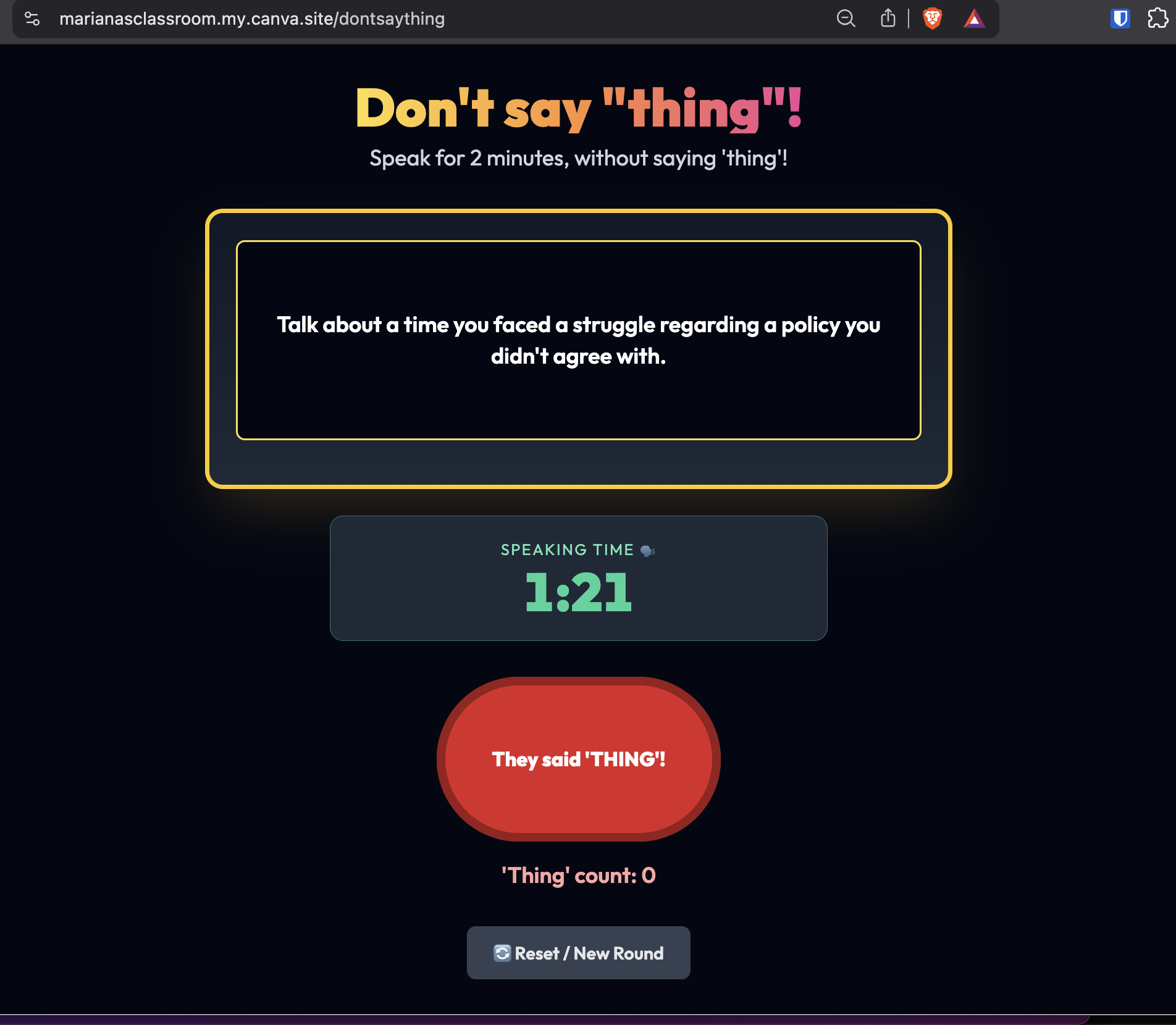
My favorite feature is the “thing” counter.
Question Tag Race (try it here) is exactly what it sounds like: a race against the clock to practice question tags using the unit's target vocabulary: in this case, market research. Grammar practice that feels nothing like grammar practice. The list keeps growing.
Is it worth it?
Honestly, not always.
Blooket, Kahoot, Quizlet Live, Bamboozle and co, are excellent tools, and if one of them already does what you need, use it. These platforms have entire teams building and refining their games, and many of them are free or close to it.
Vibe coding your own activity makes sense in a specific situation: when what you need doesn't exist, is locked behind a paywall, or requires a level of customisation that no off-the-shelf tool can give you.
Draw That is a perfect example. I didn't build it because I think I can out-design Kahoot. I built it because I needed something very specific → a way to assign different sentences to different teams simultaneously, track points across those groups, manage rounds, and avoid repetition, all without me cutting out individual paper slips and running around the room managing chaos. That combination of features didn't exist anywhere, for free, in a way I could control.
That's the threshold question: does what I need already exist, and can I access it easily? If yes → use it. If no →now vibe coding starts to make sense.
We are at a moment where the gap between "I had this idea for a classroom tool" and "I built it" is smaller than it has ever been. In many cases, you don't need a budget for expensive software. You need your pedagogical expertise, and a willingness to experiment.
The technology is ready. The question is whether we, as language educators, are willing to reach for it.
I think you are. That's why you're here.
Want to learn how to build this yourself?
I run workshops for language teachers on exactly this, using AI tools and platforms like Canva to create digital content, interactive activities, and games for your classroom.
If you're ready to go from "this sounds cool" to "I made this myself," I'd love to work with you.
See my workshops and consulting options →
Or reach out directly at hola@marianaslearning.space, tell me what you're teaching and what you wish you had for your students. Let's build it.
Mariana Ramírez is a language educator and EdTech specialist helping teachers use AI and digital tools to create better learning experiences. She works with language departments worldwide through workshops, consulting, and bespoke training.